A misspelled name is a data error, not a cosmetic one
A certificate is a statement, made by your school, that a named person completed a course. If the name is wrong, the statement is about someone who does not exist, and the person who did the work cannot use it: an employer comparing it with an ID document, or a regulator checking a register, will see the mismatch.
It is also personal data. Under the GDPR, a student has the right to have inaccurate personal data about them corrected without undue delay.1 A spelling mistake on a certificate is exactly that kind of inaccuracy, so the question is not whether to fix it but how quickly and how cleanly.
How awarding bodies handle it
There is no single procedure; each issuer sets its own. NEBOSH, under its certificate policy (version 14, effective from May 2026), asks for valid photo ID with a change of name. Before results are declared, it issues the certificate in the corrected name free of charge; after that, a reissue in the corrected name has a fee.2 The incorrect certificate is voided, and the learner is asked to destroy it securely.3 NCFE, on its page read on 19 November 2026, lets the training centre correct a learner's name within three months of issue, and a replacement is issued automatically; after three months it takes a form, a fee, and the centre voids the incorrect certificate.4
What these procedures have in common is that the old document is declared void and replaced by a new one. That works when the old certificate is a sheet of paper someone can destroy. It works badly for a PDF.
Why a PDF cannot simply be replaced
Once a PDF leaves your outbox, you cannot recall it. The student may have forwarded it to an employer, uploaded it to a job site or printed it. If you send a corrected file, two versions now exist, and nobody who receives one of them can tell which is current.
The fix is to make the certificate point somewhere you control. A certificate with a unique ID and a QR code or link to your own record can be corrected at the record: every copy, old or new, leads to the same page, and that page shows the corrected name.
Fix it in three steps
- Get the correct spelling from the student in writing, in their own words, rather than from the class list that caused the mistake. Accents and the order of surnames are the usual culprits.
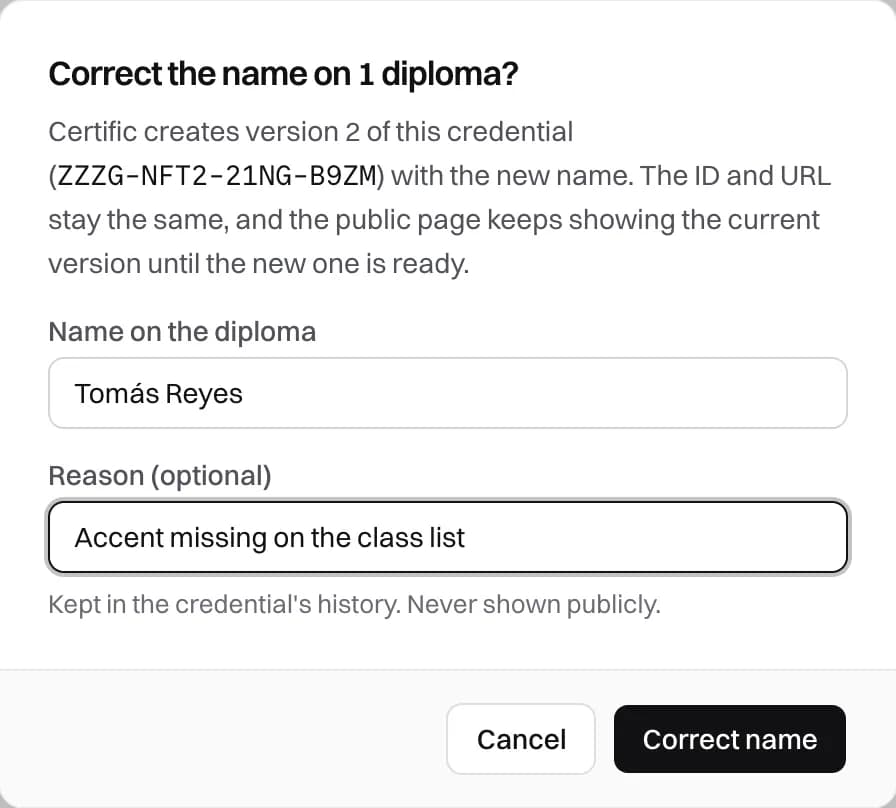
- Correct the record under the same ID, and note the reason, for example "accent missing on the class list". Keep the earlier version: it is your evidence of what was issued and when.
- Send the student the corrected certificate, and tell them that the QR code and the link on any copy they already shared now lead to the right name. If they added it to LinkedIn with its credential address, nothing needs to change there: LinkedIn links to the page.
How a correction works in Certific
In Certific, a coordinator opens the student's diploma and chooses Correct name. They type the right name and, if they want, the reason. Saving starts a new version of the diploma with the same ID and the same address. While Certific generates it, the page keeps showing the current version; once it is ready, the QR code already printed and the link already shared show the corrected name, and the new PDF is ready to download.
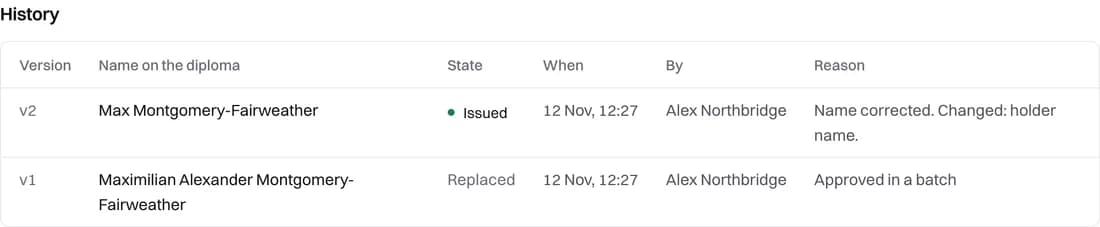
The earlier version is not deleted. The diploma's history lists every version with the name it carried, when it was changed, by whom and why. If a student or an auditor ever asks what was issued, the answer is there.
The link in the student's original email stops downloading the old PDF as soon as the diploma is corrected, so the misspelled file cannot be downloaded again by mistake. The panel reminds you to send the email again; the new email downloads the corrected PDF. Anyone who opens the diploma from its QR code or a shared link sees no correction notice, only the diploma as it is now.
Catch names before you issue
Most wrong names come from the class list, so the cheapest fix is a look before anything is issued. In Certific, the Diploma tab shows each student's diploma as it will print, and a name that cannot fit the design, or uses a character the design's font lacks, is flagged and held back until it is fixed. Issuing from a spreadsheet is covered in our guide to issuing certificates from a spreadsheet, and what a verifiable diploma is explains why the link matters more than the file.