What the big inboxes require now
Since 1 February 2024, Google requires everyone who sends to personal Gmail addresses to authenticate their mail with SPF or DKIM and to keep the rate of messages reported as spam below 0.3%. Senders of more than 5,000 messages a day to Gmail must set up both SPF and DKIM, publish a DMARC record (a policy of "none" is enough), and make the domain in the From address match the one that passes those checks.1 Yahoo has enforced the same model for its inboxes since February 2024.2 Microsoft applied it to Outlook.com, Hotmail and Live addresses from 5 May 2025, for domains that send more than 5,000 messages a day.3
In plain words: SPF lists the servers allowed to send for your domain, DKIM signs each message so it cannot be altered on the way, and DMARC tells the receiving inbox what to do when a message claims to be from your domain but fails both. Without them, an inbox has no way to tell your certificate from a forgery that uses your name.
Why certificates are hit harder than other email
A school's certificate emails have three things against them. They go out in a burst, to a whole class at once, at the end of a course, and Google asks senders to avoid sending in bursts.1 They often come from an address the student has never received anything from. And they are often sent from wherever was at hand: the coordinator's own mailbox, the mail server behind the contact form on the school's website, or a tool sending in the school's name.
A website's mail server, or a tool sending as your domain, passes these checks only if someone added the records for it to your domain. A coordinator's personal Gmail or Outlook account does pass them, but as gmail.com or outlook.com, not as your school, so the student sees a private address they do not know. Either way, the result is the complaint training centres know well: some of the class say they never got their certificate.
What a school can change
- Send from your own domain, through a service set up for it: add the SPF and DKIM records it gives you to your domain's DNS. If you send from a personal mailbox, move certificate emails off it. The other sound route is a platform that sends from its own authenticated domain in your school's name, with replies coming back to you.
- Publish a DMARC record, even one that only reports at first, so you see who sends in your name.
- Use a sender name students recognise, the school's own, and put their name and the course in the subject line, so the email reads as expected rather than as a campaign.
- Tell the class before the course ends that their certificate will arrive by email, from whom, and to look in junk if it does not.
- Keep the email short and make every word live text, so it still reads when pictures are blocked. Link to the certificate's page rather than attaching the file: a link can never go out of date if you later correct the certificate.
- Watch what bounces. An address typed wrong on the class list will never receive anything, however well the domain is set up.
What Certific does, and what our own test showed
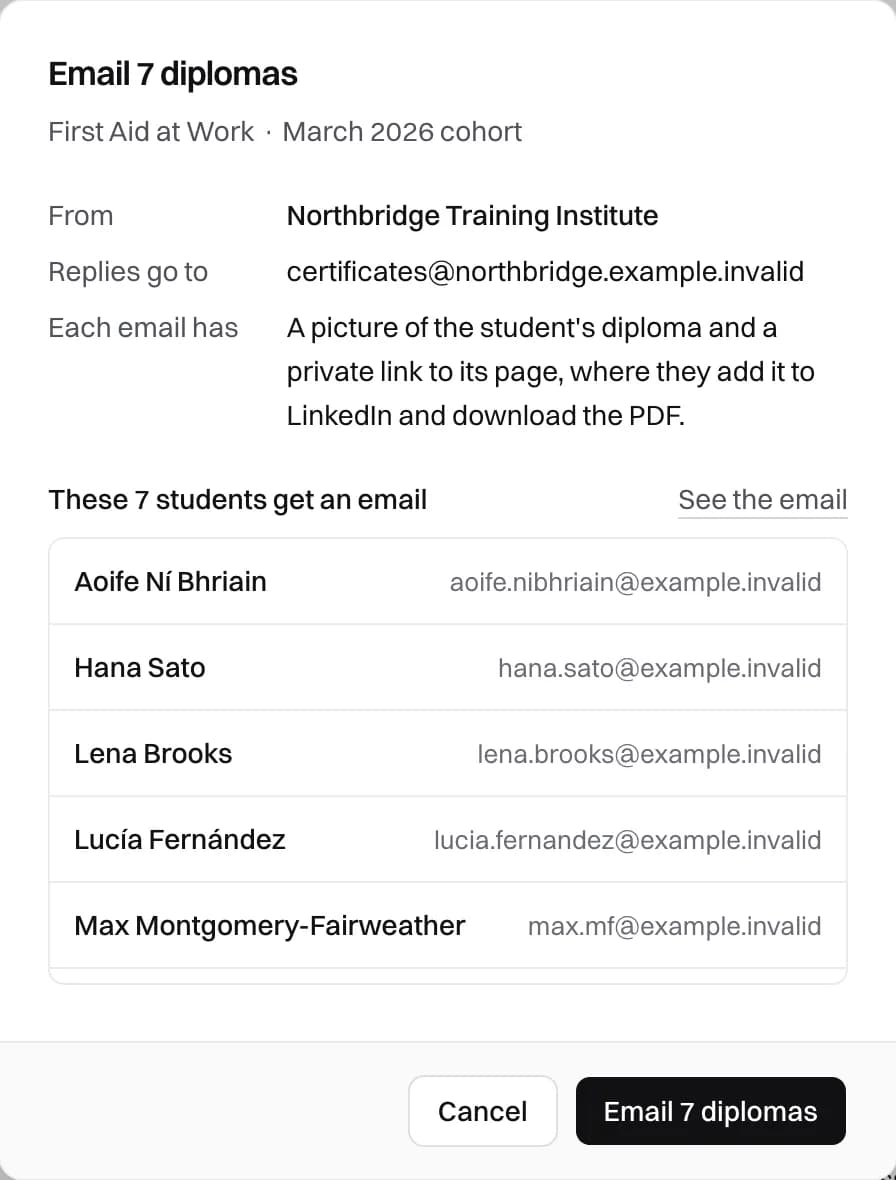
Certific sends diploma emails with the school's name as the sender name, from Certific's own address on a domain set up with SPF, DKIM and DMARC, and with replies going to the school's support address. Before anything goes out, the review says how many emails will be sent, from whom, where replies will go, and who will be skipped and why: no email address, diploma not ready, revoked or already emailed.
The email itself carries no attachment and no tracking pixel: a small picture of the student's own diploma, one sentence, a button to the diploma's page and three links (LinkedIn, a share link, the PDF). Every word is text, so it reads with pictures blocked. The PDF is downloaded from the page, which always holds the current version, so a corrected or revoked diploma never leaves a stale file in an inbox.
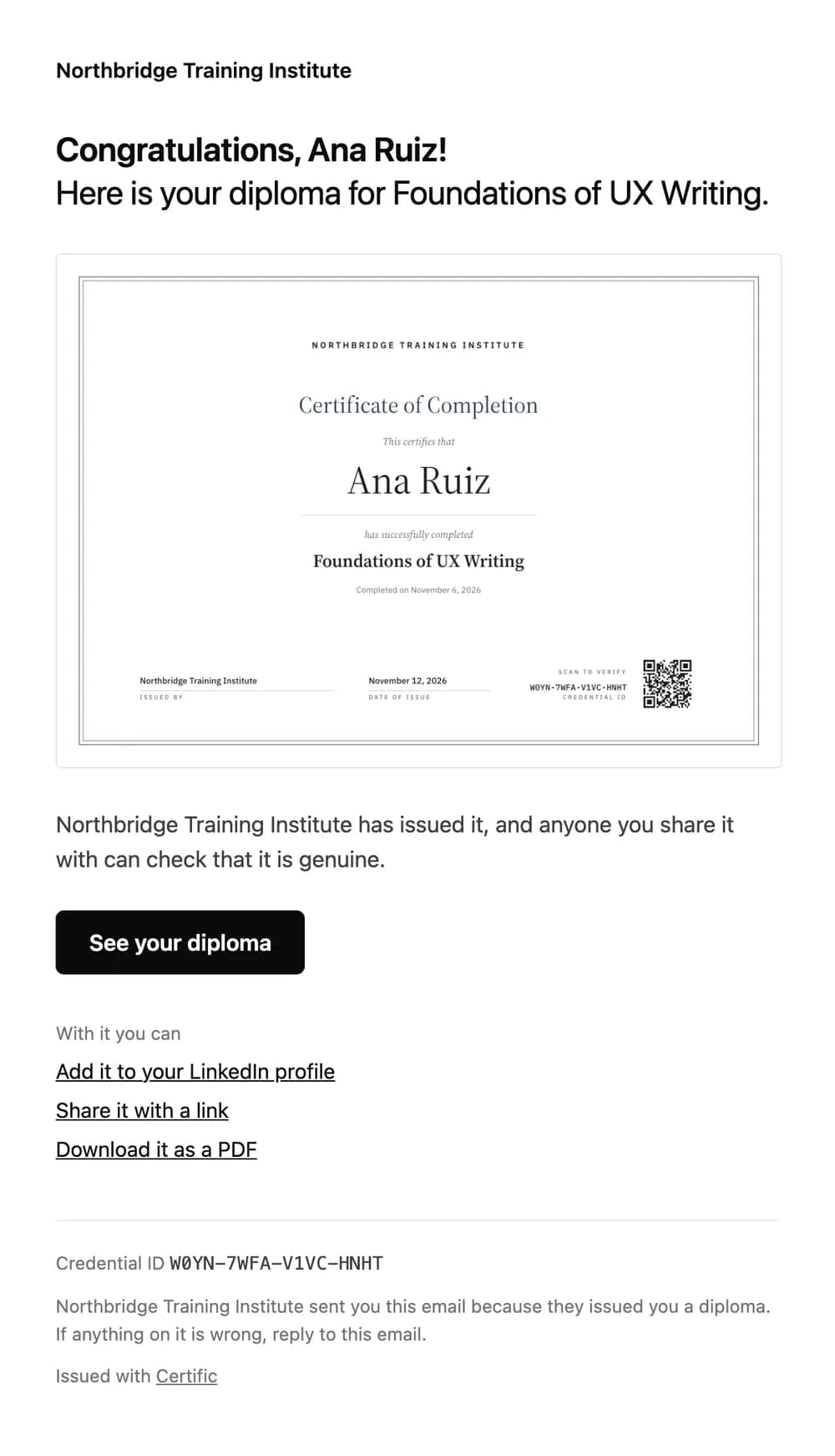
On 18 November 2026 we sent a fictitious diploma, with an earlier version of this email that had no pictures, through the production email service to a Gmail inbox. It arrived in the inbox, under the Updates tab, with SPF, DKIM and DMARC all passing for Certific's sending domain. One test is not a guarantee for every inbox, so the panel shows each email's state, Sent, Delivered or Bounced, next to each student, and a coordinator can resend to a corrected address.
Certific also limits how many diploma emails a school that has not verified its domain can send in a day, so an account nobody has checked cannot send in bulk from the address every school shares.
If students still cannot find it
Ask a student who did not receive it to search their mailbox, junk included, for the course name. If the email bounced, the panel says so, and the address on the class list is usually the problem: correct it and resend. If it arrived, it is in their junk or promotions folder, and marking it as not spam helps their inbox recognise the next one.
Once they have it, the diploma's page is the part that lasts: its QR code and link let anyone check it, as our guide to checking a certificate's QR code explains, and issuing from a spreadsheet shows where the class list's email addresses come in.